

AISURE (Red Hat Technical Supportability Review with AI)

AISURE Link: https://access.redhat.com/support/cases/#/analyze (need a RH account)
Target users: External users with access to PCM
Team: Product · Engineering · UX
Timeline: 2 months
Making supportability analysis easier to understand and act on
An AI-assisted experience that helps Red Hat customers analyze their OpenShift environment and understand their supportability results.
The Challenge
How might we make a complex technical process feel simple and predictable?
Supportability analysis involves technical information, data uploads, processing time, and a final report.
For users, the challenge wasn't only completing the process. They needed to understand:
What do I need to do?
What information do I need?
What is happening after I upload it?
When will I get my results?
What should I do with the results?
This became the foundation for this project.
What I learned
Users needed guidance!
01 Clarify the process
Users needed to understand where they were in the journey.
02 Set expectations
The analysis could take time, so users needed clear feedback about what was happening.
03 Make the outcome actionable
The final report needed to help users understand what to do next.
The journey
A guided journey from preparation to results
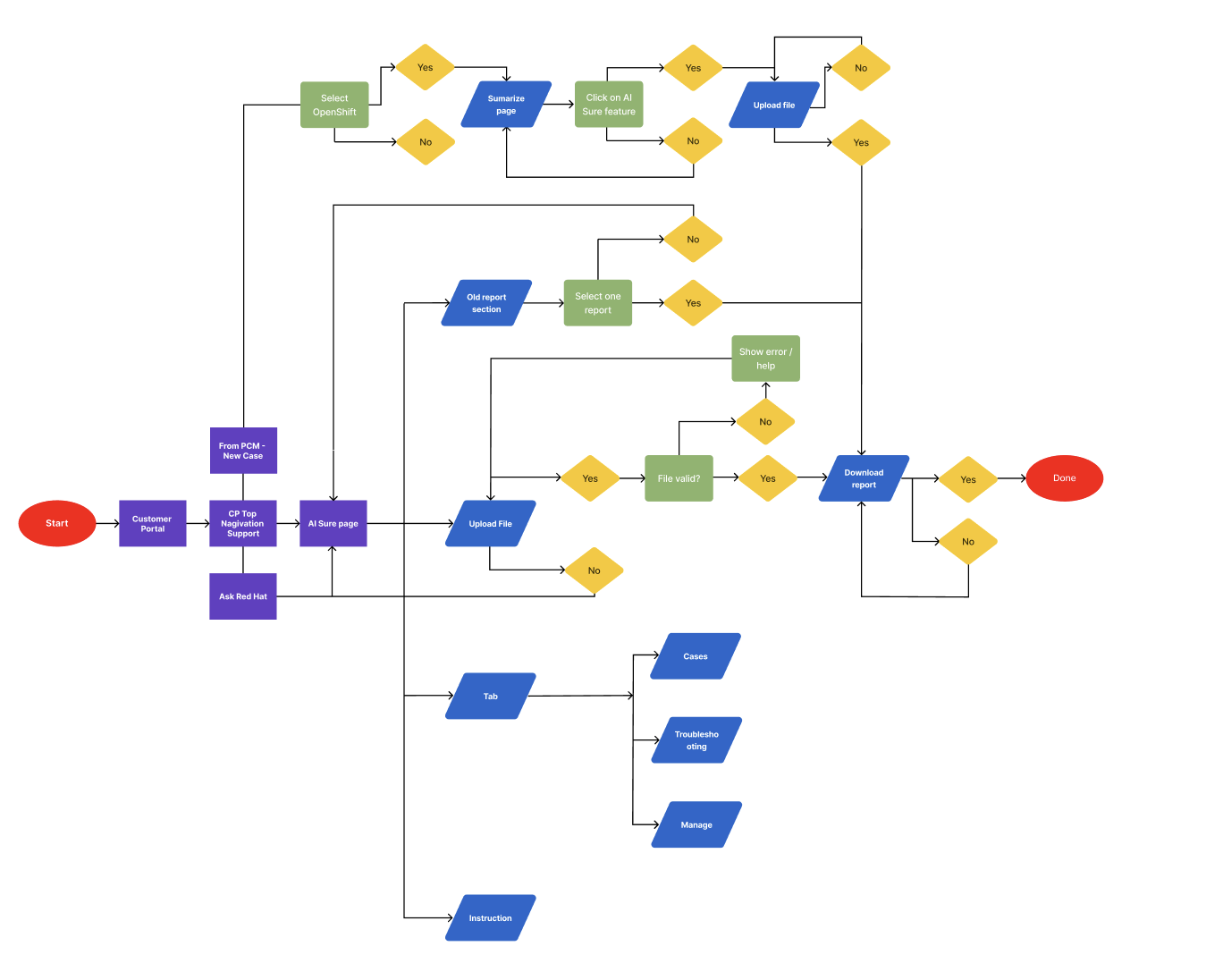
Before defining the experience, I wanted to understand how developers currently navigated support and where they experienced friction. I reviewed the initial wireframes created by Engineering and used them as a starting point for conversations with Product, Engineering, and key stakeholders. Together, we explored how users decide between asking a question, submitting a file for review, or opening a support case.
UNDERSTAND Understand what AISURE does ↓ PREPARE Get the required information ready ↓ UPLOAD Provide the OpenShift data ↓ ANALYZE AISURE processes the data ↓ GENERATE The supportability report is created ↓ REVIEW Understand the results and next steps
01 Main page
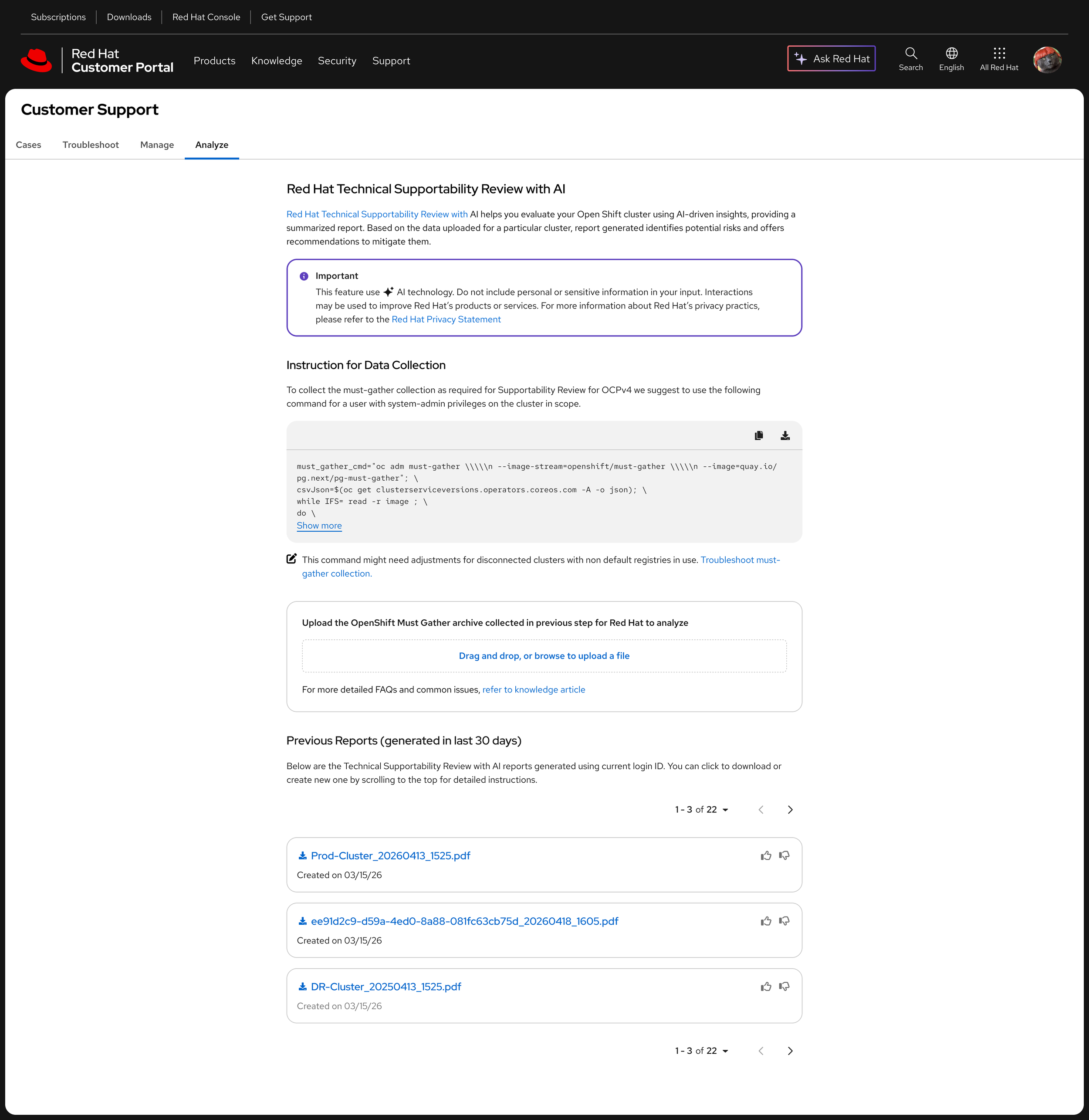
The main page introduces AISURE from top to bottom, helping users understand what the experience is about and what they can do with it.
03 Generate
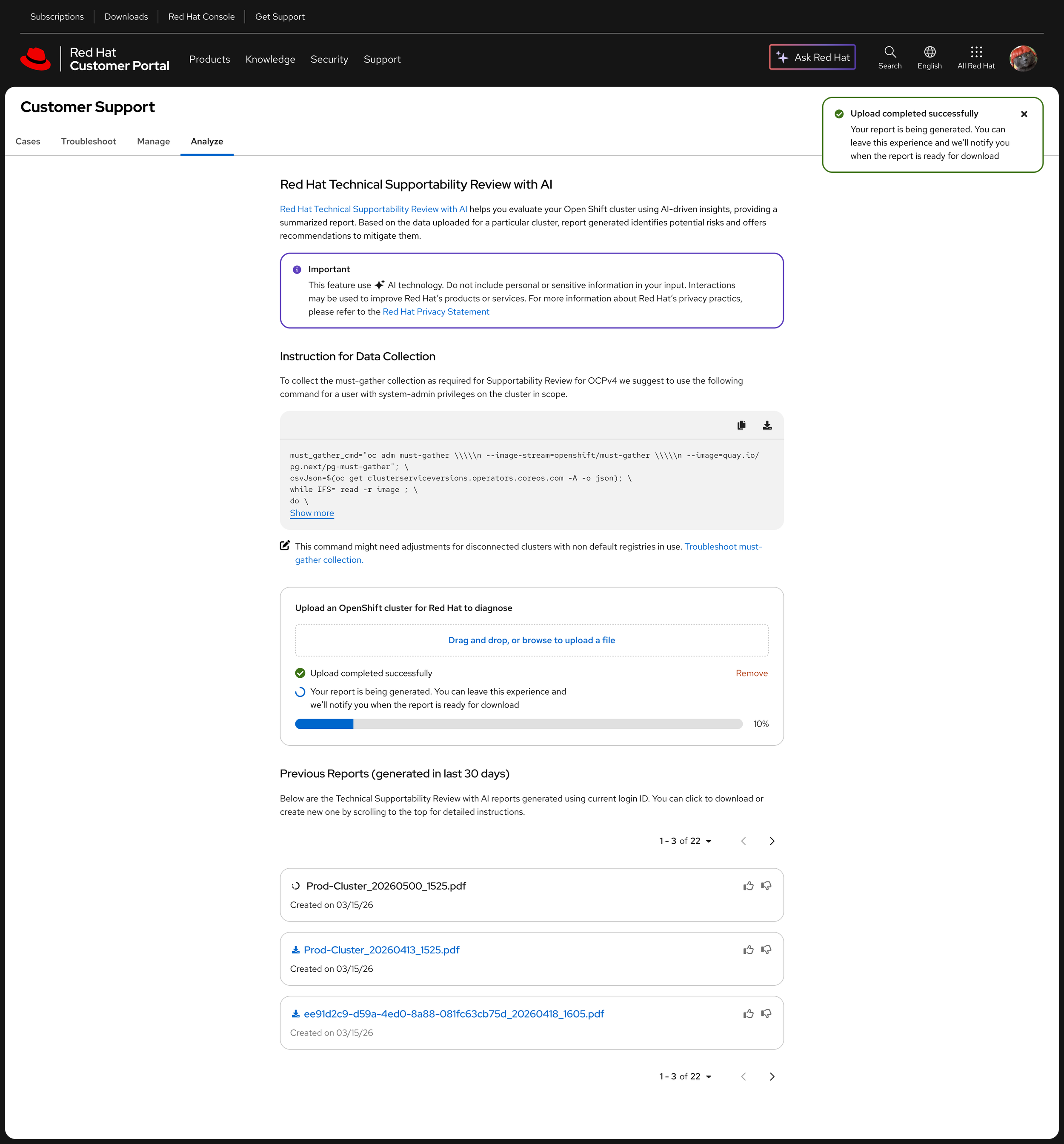
The third process is Generate. This is the longest step, so we didn’t want users to have to stay on the page and wait. They can leave and continue with their work while the report is being generated. Once it’s ready, they receive a notification through both the Customer Portal and PCM, making it easy to come back and access the report.
02 Analyse
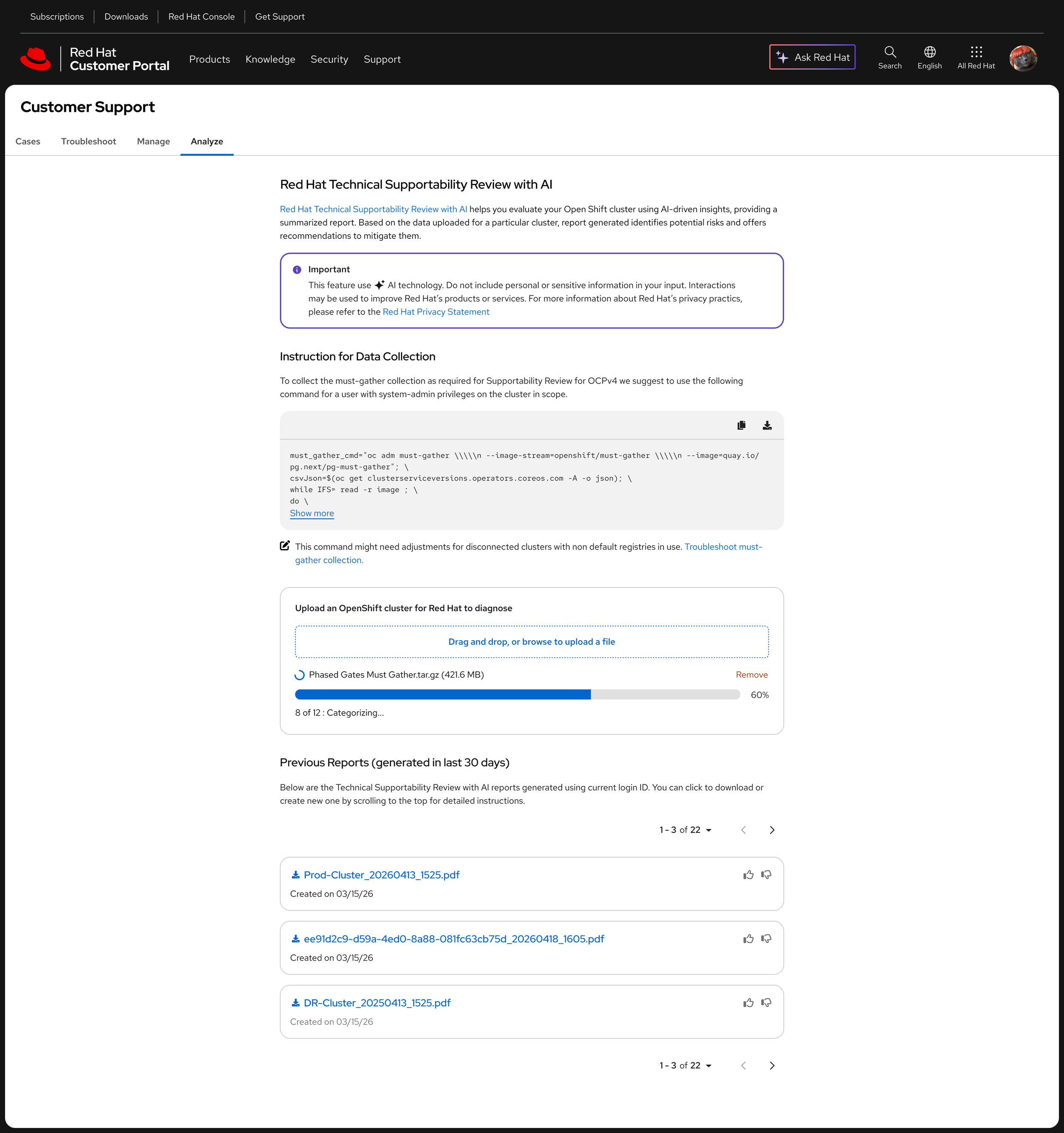
The second process is Analyze. This is where AISURE processes the uploaded data. While the analysis is running, the user can see that the system is working and understand what is happening in the background.
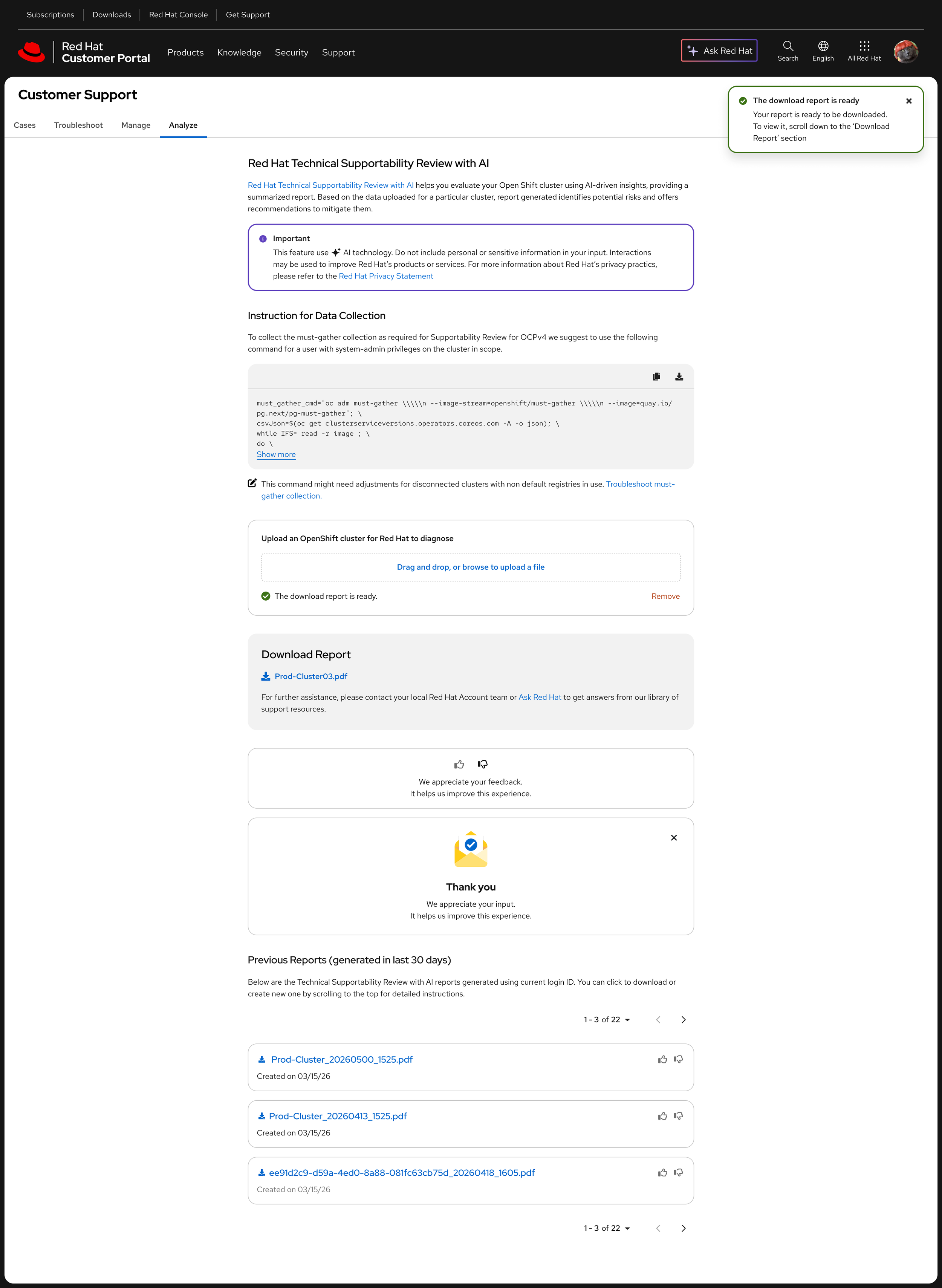
04 Report ready + Feedback Collector
Finally, the report is ready and a new feature appears: the “Feedback Collector.” This gives us an opportunity to collect feedback directly from the experience.
We also needed to consider what happens if users change their minds or want to provide feedback at a later point. To support this, we introduced thumbs-up and thumbs-down actions directly on each report preview card on the main page.
Conclusion
From a complex workflow to a guided experience
Designing the experience
From a complex workflow to a guided experience
Making the first step clear
Users needed to understand what AISURE would analyze before starting the process. I introduced clear explanations and expectations before asking them to provide their data.
Helping users understand what happens next
Because analysis can take time, I designed the processing state to communicate progress and reassure users that the system was working.
Helping users understand what happens next
Because analysis can take time, I designed the processing state to communicate progress and reassure users that the system was working.
Keeping users informed
Rather than requiring users to stay on the page while the analysis was running, the experience communicates when the report is ready.
After structuring the experience through sketches and low-fidelity explorations, I presented the proposed direction to Product, Engineering, and key stakeholders. Once we aligned on the approach, I moved into the final design phase, translating the workflow into a polished and cohesive experience.
AISURE
It was important for me to visualize the workflow while keeping all the feedback I had received in mind. I wanted to explore a way to group all the steps users needed to go through in one place, rather than spreading them across the page. After exploring different options, I found that a top-to-bottom structure was the clearest approach. It allowed users to follow the experience naturally, from understanding what AISURE does to reviewing their final results.